Offline calendars: some plans don't belong on a server
Your partner can see your shared calendar, which is a problem when one of the things on it is their birthday present. Some plans belong on a server, where the family can see them. Others, like gift ideas, a health log or a journal, are better kept to yourself. KashCal 2026.10.30 gives those their own place: as many offline calendars as you like.
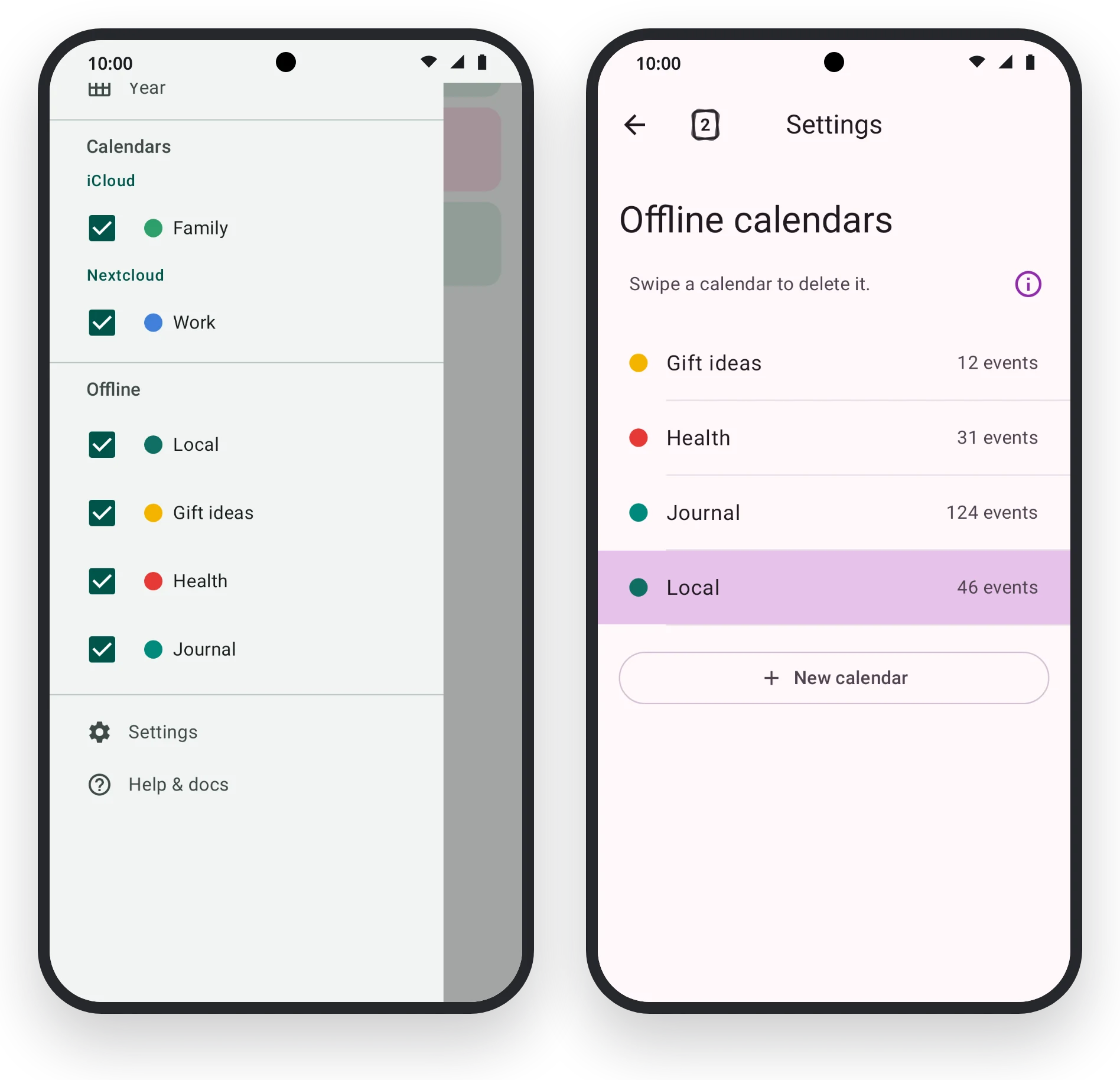
Make as many as you like
KashCal has always come with one offline calendar, Local. Now you can add more. Open Settings, tap Offline calendars, then New calendar. Give it a name, keep the color KashCal picked or choose your own, and tap Create.
You don't have to leave what you're doing to make one. In the event form, tap the calendar row and choose New offline calendar at the end of the list. The new calendar becomes the event's calendar, and whatever you've typed stays put.
In the drawer and in the calendar list, offline calendars sit together at the end, under Offline, so you can always tell which plans stay at home.
Where they live
Offline calendars are kept in KashCal's own private storage, not in Android's shared calendar storage. Other apps on your phone can't read them, even apps that have calendar permission, and they don't turn up in other calendar apps or widgets. There's no account to make and nothing to sign in to. If you're new to KashCal, the first screen asks where your calendars are, and Use offline calendar is one tap away.
They leave your phone only when you send them somewhere: when you share or export an event or a calendar, move or copy an event to a calendar that syncs, or turn on the backup below. Android's own backup and phone-to-phone transfer also carry them, as they do the rest of KashCal.
Never synced, still backed up
A calendar that never syncs has one weakness: if the phone goes, the calendar goes with it. So offline calendars can now back themselves up.
Open Settings, and under Backup & restore tap Automatic calendar backup, then Choose folder. From then on KashCal saves each offline calendar to that folder as its own .ics file, Gift-ideas.ics for Gift ideas, every 12 hours unless you pick another interval, from 1 hour to 30 days. It keeps the last 3 copies of each file unless you ask for more or fewer. The first backup runs as soon as you choose a folder, and Back up now runs one whenever you like.
Backup is off until you choose a folder, and the files stay where you put them. Other apps that can open that folder can read them, and if you pick a folder from a cloud storage app, that app stores the files and uploads them, so choose one you trust with them. Backup & restore has the details.
You can also export a calendar on its own as an .ics file. For an offline calendar, tap it in Offline calendars and choose Export calendar. For your iCloud and CalDAV calendars, feeds and birthdays, open Settings and tap Export calendars under Backup & restore.
Tidying up
Tap a calendar to rename it, recolor it or export it. Its events that have no color of their own follow the new color.
To delete one, swipe its row. Deleting removes the calendar and its events for good, and there's no server to bring them back, so KashCal asks first, right in the row: tick "Also delete 12 events", then tap Delete. The built-in Local calendar can't be deleted. Offline calendars covers every option.
Also in 2026.10.30
- A new date and time sheet. Start and end share one sheet, chips set the length in one tap, and the sheet holds still while you spin the wheel.
- Print your week. Account hub > Print your week gives you a page for the fridge. Your notes stay off the paper.
- Smart event add reads "party tomorrow evening at 9", "Aug 23-28" and "an hour and a half".
The gift ideas are safe. What you buy is still up to you.