Calendar notifications that feel like push, without the push
When someone moves the swimming lesson on the family calendar, you want to know before you're standing at the pool. The usual answer is push notifications: the calendar server taps your phone on the shoulder the moment something changes. KashCal gets you most of the way there, without any of the machinery push needs.
What push would take
For a server to wake your phone, it has to hand the message to a push service. On Android that's usually Google's Firebase Cloud Messaging, which needs Google Play services on the phone. The app then needs a server of its own that watches your calendar account and forwards each change. CalDAV has a push extension in the works, but few servers offer it, and iCloud doesn't offer push to other apps at all.
That's a lot to ask of a calendar whose whole point is that your events go between your phone and your calendar server, and nowhere else. A relay server would have to know your accounts. Phones without Google Play services, which includes plenty of F-Droid users, would get nothing.
What KashCal does instead
KashCal already syncs in the background, on the schedule you pick in Sync frequency: every 15 or 30 minutes, every 1, 6, 12 or 24 hours, or Manual only. The default is every hour. Each sync compares what your iCloud or CalDAV server sends with what was there before, and writes the differences into Recent changes.
Turn on Change notifications in Settings, under Sync, and a background sync that finds something also posts a notification, worded the way Recent changes reads. One change names the event and what happened to it, and a tap opens the event. Two or three get a line each. More get a count and the calendars involved.
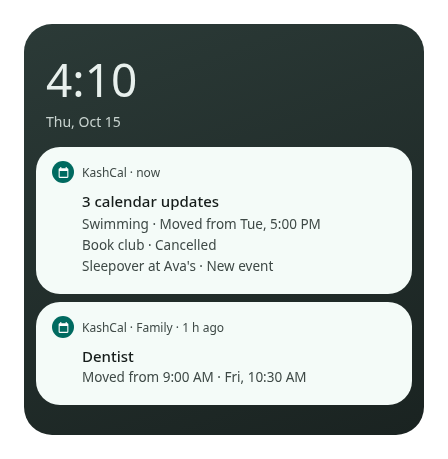
There's no relay server and no Google Play services involved. The change travels from your calendar server to your phone the way it always did, and KashCal mentions it on arrival.
The "almost"
Push is instant, and this isn't. A change shows up on the next background sync, so with the default it can take up to an hour, or 15 minutes at the shortest setting. Android can also hold background work back to save battery. And if you start a sync yourself, you're already looking at the app, so KashCal shows its message inside the app instead of a notification.
Then decide who gets to talk
The other half shipped the same week. Settings has a Calendar notifications page, under Calendars & accounts, with a switch for every calendar KashCal shows. Mute the school newsletter feed and it stops sending reminders, invitation alerts and change notifications, while it still shows and syncs. Calendars from your phone's other apps get one switch on their heading that covers all of them, including ones you add later.
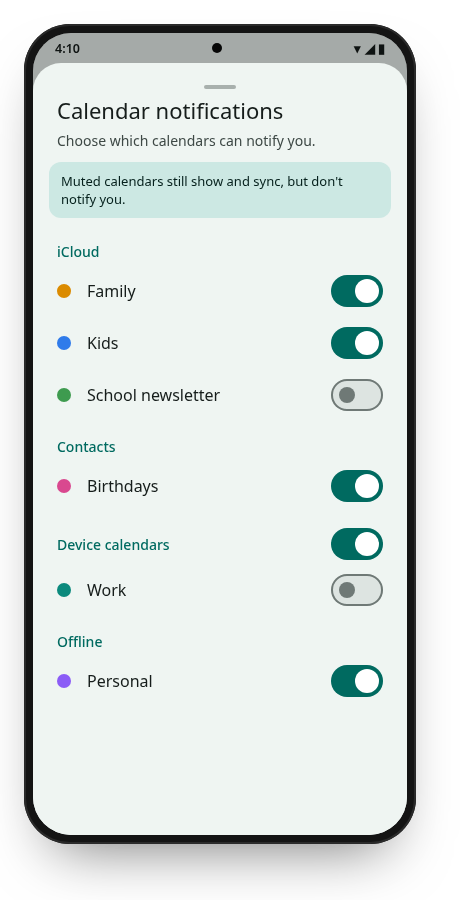
So the swimming lesson that moved gets through, and the newsletter about next term's bake sale waits until you open the calendar yourself.