<?xml version="1.0" encoding="utf-8"?><?xml-stylesheet type="text/xsl" href="atom.xsl"?>
<feed xmlns="http://www.w3.org/2005/Atom">
    <id>https://kashcal.onekash.org/blog</id>
    <title>KashCal Blog</title>
    <logo>https://kashcal.onekash.org/img/logo.png</logo>
    <updated>2026-07-16T00:00:00.000Z</updated>
    <generator>https://github.com/jpmonette/feed</generator>
    <link rel="alternate" href="https://kashcal.onekash.org/blog"/>
    <subtitle>KashCal Blog</subtitle>
    <icon>https://kashcal.onekash.org/img/favicon.ico</icon>
    <entry>
        <title type="html"><![CDATA[The calendar with no account to sign up for]]></title>
        <id>https://kashcal.onekash.org/blog/no-account-private-calendar-android</id>
        <link href="https://kashcal.onekash.org/blog/no-account-private-calendar-android"/>
        <updated>2026-07-16T00:00:00.000Z</updated>
        <summary type="html"><![CDATA[KashCal has no account, no trackers, and no servers of its own. Here's what that actually means for your calendar, and why it's built that way.]]></summary>
        <content type="html"><![CDATA[<p>Most apps greet you with a wall: sign in, or create an account. A calendar app doing that is quietly asking you to route your dentist appointments, your interviews, and your "lunch??" through a stranger's servers so it can hand them back to you later. KashCal never asks. There is no account, because there is nothing to sign into.</p>
<!-- -->
<h2 class="anchor anchorTargetStickyNavbar_Vzrq" id="no-account-because-there-are-no-kashcal-servers">No account, because there are no KashCal servers<a href="https://kashcal.onekash.org/blog/no-account-private-calendar-android#no-account-because-there-are-no-kashcal-servers" class="hash-link" aria-label="Direct link to No account, because there are no KashCal servers" title="Direct link to No account, because there are no KashCal servers" translate="no">​</a></h2>
<p>This isn't a privacy setting you switch on. It's the shape of the app. There is <strong>no KashCal account</strong> to create, <strong>no KashCal server</strong> anywhere for your events to pass through, and <strong>no analytics, telemetry, or ad SDK</strong> riding along inside. There is, quite literally, nowhere for us to send your data, so there is nothing for us to collect. A privacy policy is easy to write when the honest version is "we don't have your data and never did."</p>
<h2 class="anchor anchorTargetStickyNavbar_Vzrq" id="your-calendar-lives-on-your-phone">Your calendar lives on your phone<a href="https://kashcal.onekash.org/blog/no-account-private-calendar-android#your-calendar-lives-on-your-phone" class="hash-link" aria-label="Direct link to Your calendar lives on your phone" title="Direct link to Your calendar lives on your phone" translate="no">​</a></h2>
<p>Your events sit in a <a class="" href="https://kashcal.onekash.org/docs/privacy/overview">secure database on your device</a> that other apps can't read. The only things that ever leave your phone go to servers <strong>you</strong> chose: your events sync to your own calendar server, iCloud, Nextcloud, Fastmail, or <a class="" href="https://kashcal.onekash.org/docs/sync/supported-servers">any CalDAV service</a>, and an RSVP goes to the organizer who invited you. Nothing else goes anywhere.</p>
<p>And when you're offline, none of that matters. KashCal is <a class="" href="https://kashcal.onekash.org/docs/sync/how-sync-works">offline-first</a>: everything you do lands instantly on the device, and it quietly catches up with your servers when there's a connection. A plane, a basement, a dead zone, the calendar still works.</p>
<h2 class="anchor anchorTargetStickyNavbar_Vzrq" id="passwords-that-cant-be-lifted-from-a-backup">Passwords that can't be lifted from a backup<a href="https://kashcal.onekash.org/blog/no-account-private-calendar-android#passwords-that-cant-be-lifted-from-a-backup" class="hash-link" aria-label="Direct link to Passwords that can't be lifted from a backup" title="Direct link to Passwords that can't be lifted from a backup" translate="no">​</a></h2>
<p>When you connect a calendar server, its password is <a class="" href="https://kashcal.onekash.org/docs/privacy/overview">encrypted on your device</a> with AES-256, and the key lives in the Android Keystore, hardware-backed where the phone supports it. The key is tied to that one device, so a stolen backup can't be replayed onto another phone to reach your accounts. The trade-off is honest: move to a new phone and you re-enter your passwords. We think that's the right side of the line.</p>
<h2 class="anchor anchorTargetStickyNavbar_Vzrq" id="permissions-you-can-actually-reason-about">Permissions you can actually reason about<a href="https://kashcal.onekash.org/blog/no-account-private-calendar-android#permissions-you-can-actually-reason-about" class="hash-link" aria-label="Direct link to Permissions you can actually reason about" title="Direct link to Permissions you can actually reason about" translate="no">​</a></h2>
<p>KashCal asks only for what a feature in front of you needs, and it asks in context, with a plain reason. Contacts is for suggesting guests and showing birthdays. Calendar access is for showing the calendars other apps already keep on your phone. Decline any of it and the rest of the app keeps working. No all-or-nothing gate at the door.</p>
<h2 class="anchor anchorTargetStickyNavbar_Vzrq" id="free-and-open-about-it">Free, and open about it<a href="https://kashcal.onekash.org/blog/no-account-private-calendar-android#free-and-open-about-it" class="hash-link" aria-label="Direct link to Free, and open about it" title="Direct link to Free, and open about it" translate="no">​</a></h2>
<p>KashCal is free and open source under Apache-2.0, so "we don't track you" isn't a promise you have to take on faith. The source is <a href="https://github.com/KashCal/KashCal" target="_blank" rel="noopener noreferrer" class="">right there to read</a>. If we ever added a tracker, someone would see the commit.</p>
<p><a href="https://f-droid.org/packages/org.onekash.kashcal/" target="_blank" rel="noopener noreferrer" class="">Get KashCal free on F-Droid</a>. No account, no ads, no catch. Read <a class="" href="https://kashcal.onekash.org/docs/privacy/overview">how privacy works</a> in full.</p>
<p>Your calendar was never anyone else's business. Now it's built that way.</p>]]></content>
        <author>
            <name>Kash</name>
        </author>
        <category label="Privacy" term="Privacy"/>
        <category label="Behind the scenes" term="Behind the scenes"/>
    </entry>
    <entry>
        <title type="html"><![CDATA[Tags: label your events, not just file them]]></title>
        <id>https://kashcal.onekash.org/blog/kashcal-event-tags</id>
        <link href="https://kashcal.onekash.org/blog/kashcal-event-tags"/>
        <updated>2026-07-15T00:00:00.000Z</updated>
        <summary type="html"><![CDATA[KashCal 2026.07.15 adds event tags: colored #chips you set in the form or type into Quick Add, shown across the day, week, and agenda views.]]></summary>
        <content type="html"><![CDATA[<p>Since the beginning of KashCal, your events have been sorted the way a coat check sorts coats: by which calendar you flung them into, and not one thought more. This release lets you label them yourself. Meet tags.</p>
<!-- -->
<h2 class="anchor anchorTargetStickyNavbar_Vzrq" id="type-a-tag-get-a-chip">Type a #tag, get a chip<a href="https://kashcal.onekash.org/blog/kashcal-event-tags#type-a-tag-get-a-chip" class="hash-link" aria-label="Direct link to Type a #tag, get a chip" title="Direct link to Type a #tag, get a chip" translate="no">​</a></h2>
<p>Add a tag in the <a class="" href="https://kashcal.onekash.org/docs/events/event-form">event form</a>, or fling a <code>#dentist</code> straight into <a class="" href="https://kashcal.onekash.org/docs/events/quick-add">Quick Add</a> and watch it land as a colored chip. That chip then follows the event around the <a class="" href="https://kashcal.onekash.org/docs/calendar/views">day, week, and agenda views</a> like it owns the place. Tap the event open and the tags are right there in quick view, quietly confirming that yes, this is a <code>#focus</code> block, and no, it is not the third <code>#standup</code> of the day you had every right to skip.</p>
<p>Start typing and KashCal hands back the tags you already use, ranked by how often you reach for them. It is the only known cure for "Errands" quietly fracturing into "errands," "ERRANDS," and one deeply confident "Errnads" by Thursday.</p>
<p>And if you decide tags belong above your notes rather than below, the row's little ⋮ menu will move it, and we will pretend that was our idea all along.</p>
<h2 class="anchor anchorTargetStickyNavbar_Vzrq" id="the-honest-fine-print">The honest fine print<a href="https://kashcal.onekash.org/blog/kashcal-event-tags#the-honest-fine-print" class="hash-link" aria-label="Direct link to The honest fine print" title="Direct link to The honest fine print" translate="no">​</a></h2>
<p>Tags currently work on the events KashCal syncs itself: your iCloud and other CalDAV calendars. The device's own calendars, the Google, Samsung, and Exchange ones Android politely shoves through the door, are still tag-free for a release or two while we teach them manners. Rather than let your tags quietly vanish into the void, we simply hide the tag row on those events for now.</p>
<p>This is version one of roughly several. More tags, more places, more tricks are queued up.</p>
<h2 class="anchor anchorTargetStickyNavbar_Vzrq" id="while-we-had-the-tweezers-out">While we had the tweezers out<a href="https://kashcal.onekash.org/blog/kashcal-event-tags#while-we-had-the-tweezers-out" class="hash-link" aria-label="Direct link to While we had the tweezers out" title="Direct link to While we had the tweezers out" translate="no">​</a></h2>
<p>A few papercuts, gone:</p>
<ul>
<li class="">Events with no length, the ones you pin to a single moment, used to disappear entirely in the day and week views. They now show up as the small blocks they always meant to be, and no longer draw on top of each other when they overlap.</li>
<li class="">Emoji in a synced description arrive as the emoji you sent, instead of a puzzled little box.</li>
<li class="">A garbled duration from some other app can no longer bend an event's end time back to before it started.</li>
</ul>
<h2 class="anchor anchorTargetStickyNavbar_Vzrq" id="everything-in-this-release">Everything in this release<a href="https://kashcal.onekash.org/blog/kashcal-event-tags#everything-in-this-release" class="hash-link" aria-label="Direct link to Everything in this release" title="Direct link to Everything in this release" translate="no">​</a></h2>
<ul>
<li class="">Event tags: colored chips on events, shown in the day, week, and agenda views and in the event quick view, on iCloud and CalDAV events for now</li>
<li class="">Create tags from the event form with usage-ranked suggestions and inline <code>#</code> autocomplete in the title</li>
<li class="">Add tags from Quick Add by typing <code>#tag</code>, persisting across create and all edit scopes</li>
<li class="">Reorder the form tag row above or below notes from its ⋮ menu</li>
<li class="">Tidied the event-form layout, and moved the location field up under the title</li>
<li class="">Fixed zero-length and very short events vanishing or overlapping in the day, 3-day, and week views</li>
<li class="">Fixed emoji and other extended characters in synced descriptions rendering as a stray box or wrong character</li>
<li class="">Fixed a malformed event duration producing an end time before the start</li>
<li class="">Fixed self-hosted CalDAV/ICS sync hanging on "Preparing to sync" over LAN or VPN networks</li>
</ul>
<p>Small labels, better plumbing, fewer papercuts. Tag it and move on.</p>]]></content>
        <author>
            <name>Kash</name>
        </author>
        <category label="Releases" term="Releases"/>
        <category label="Announcements" term="Announcements"/>
    </entry>
    <entry>
        <title type="html"><![CDATA[Ninety days ahead, and a timeline that remembers]]></title>
        <id>https://kashcal.onekash.org/blog/kashcal-agenda-90-days-timeline-memory</id>
        <link href="https://kashcal.onekash.org/blog/kashcal-agenda-90-days-timeline-memory"/>
        <updated>2026-07-13T00:00:00.000Z</updated>
        <summary type="html"><![CDATA[KashCal 2026.07.13 widens the agenda to 90 days, adds a scroll-aware month header, remembers your timeline zoom across restart, and fixes the month view.]]></summary>
        <content type="html"><![CDATA[<p>Your agenda finally learned to read the room. Day in, day out, its top bar proudly announced "Agenda," heroically confirming that the agenda screen was, against all odds, the agenda screen. Thank you, brave label. It has now been reassigned.</p>
<!-- -->
<h2 class="anchor anchorTargetStickyNavbar_Vzrq" id="the-agenda-knows-what-month-it-is">The agenda knows what month it is<a href="https://kashcal.onekash.org/blog/kashcal-agenda-90-days-timeline-memory#the-agenda-knows-what-month-it-is" class="hash-link" aria-label="Direct link to The agenda knows what month it is" title="Direct link to The agenda knows what month it is" translate="no">​</a></h2>
<p>The top of the <a class="" href="https://kashcal.onekash.org/docs/calendar/views">agenda</a> now shows the month you're actually looking at, and keeps pace as you scroll, so August rolls into September without you wondering where the summer went. It's the same month header the week and month views use, now doing an honest day's work over here too.</p>
<p>And there's more of it to scroll: <strong>ninety days ahead instead of thirty</strong>, because your future has a way of arriving whether we render it or not. A full quarter, in one list, no swiping to the next screen to find out what October is holding.</p>
<h2 class="anchor anchorTargetStickyNavbar_Vzrq" id="a-timeline-that-remembers">A timeline that remembers<a href="https://kashcal.onekash.org/blog/kashcal-agenda-90-days-timeline-memory#a-timeline-that-remembers" class="hash-link" aria-label="Direct link to A timeline that remembers" title="Direct link to A timeline that remembers" translate="no">​</a></h2>
<p>The day, 3-day, and week timelines have been persuaded to stop having amnesia. Pinch to zoom the hours in or out to the density you like, and it now <strong>stays exactly where you left it</strong> after you close the app, rather than resetting to the default overnight and pretending the two of you never met.</p>
<p>It restores the zoom and the scroll position together, so you reopen at the same time of day, at the same size. This is per-device UI comfort, so it isn't dragged along in your settings backup, it just makes the phone in your hand feel like the one you were using yesterday.</p>
<h2 class="anchor anchorTargetStickyNavbar_Vzrq" id="back-from-1969">Back from 1969<a href="https://kashcal.onekash.org/blog/kashcal-agenda-90-days-timeline-memory#back-from-1969" class="hash-link" aria-label="Direct link to Back from 1969" title="Direct link to Back from 1969" translate="no">​</a></h2>
<p>The month and full-month views had a charming habit of opening in <strong>December 1969</strong> if you arrived from the agenda without tapping a day first. Lovely for nostalgia, useless for dentist appointments. It now opens in the current month, having been gently reminded which decade we are all living in.</p>
<h2 class="anchor anchorTargetStickyNavbar_Vzrq" id="everything-in-this-release">Everything in this release<a href="https://kashcal.onekash.org/blog/kashcal-agenda-90-days-timeline-memory#everything-in-this-release" class="hash-link" aria-label="Direct link to Everything in this release" title="Direct link to Everything in this release" translate="no">​</a></h2>
<ul>
<li class="">Agenda now shows the next 90 days of events instead of 30</li>
<li class="">The agenda top bar shows the current month and updates as you scroll, replacing the static "Agenda" title</li>
<li class="">The day, 3-day, and week timelines remember your pinch-to-zoom hour height across app restart</li>
<li class="">Fixed the month and full-month views opening on December 1969 when no day was selected yet</li>
</ul>
<p>No confetti this release, just a calendar that stops tripping over its own feet. Sweating the small stuff is our whole personality.</p>
<p>Want the flashy bits instead? <a class="" href="https://kashcal.onekash.org/blog/kashcal-challenge">Take the KashCal Challenge</a>: find the one thing your old calendar can't do, tag <strong>#KashCal</strong>, and dare a friend to match it.</p>]]></content>
        <author>
            <name>Kash</name>
        </author>
        <category label="Releases" term="Releases"/>
        <category label="Announcements" term="Announcements"/>
    </entry>
    <entry>
        <title type="html"><![CDATA[Calendar You: pick your accent, and take it to your widgets]]></title>
        <id>https://kashcal.onekash.org/blog/kashcal-calendar-you-accent-colors</id>
        <link href="https://kashcal.onekash.org/blog/kashcal-calendar-you-accent-colors"/>
        <updated>2026-07-11T00:00:00.000Z</updated>
        <summary type="html"><![CDATA[KashCal 2026.07.11 lets you pick your accent from 92 colors and carry it across the whole app and your home screen widgets, or keep Material You. Here's what changed.]]></summary>
        <content type="html"><![CDATA[<p>Last release we gave you KashCal Teal and were very pleased with ourselves. Then someone pointed out the obvious: we had spent a whole update letting you choose your color, and then chose it for you. A calendar telling you your favorite color is teal is a bit like a waiter ordering for the table. Bold. Rarely correct.</p>
<!-- -->
<h2 class="anchor anchorTargetStickyNavbar_Vzrq" id="your-color-everywhere">Your color, everywhere<a href="https://kashcal.onekash.org/blog/kashcal-calendar-you-accent-colors#your-color-everywhere" class="hash-link" aria-label="Direct link to Your color, everywhere" title="Direct link to Your color, everywhere" translate="no">​</a></h2>
<p>So this release we got out of the way. Pick your accent from all 92 colors, and it runs through the entire app and, for the first time, out onto your home screen widgets too. The agenda, week, month, and date widgets all wear it, down to a proper raised add button. You'll find it under <a class="" href="https://kashcal.onekash.org/docs/features/settings">Settings, then Appearance</a>.</p>
<p>Prefer the old magic where the color follows your wallpaper? <strong>Automatic</strong> keeps your Material You colors exactly as they were. Nothing changes unless you want it to.</p>
<p>Every color is contrast-checked as it lands, so whatever you pick, the text on top of it stays readable, in light mode and dark.</p>
<h2 class="anchor anchorTargetStickyNavbar_Vzrq" id="calendar-you">Calendar You<a href="https://kashcal.onekash.org/blog/kashcal-calendar-you-accent-colors#calendar-you" class="hash-link" aria-label="Direct link to Calendar You" title="Direct link to Calendar You" translate="no">​</a></h2>
<p>Our marketing team, several donuts deep by mid-afternoon, has decided to call this <strong>Calendar You</strong>. We did the math on 92 colors, one calendar, and infinite you, and we could not find the flaw, so it is approved. Please clap.</p>
<h2 class="anchor anchorTargetStickyNavbar_Vzrq" id="two-smaller-kindnesses">Two smaller kindnesses<a href="https://kashcal.onekash.org/blog/kashcal-calendar-you-accent-colors#two-smaller-kindnesses" class="hash-link" aria-label="Direct link to Two smaller kindnesses" title="Direct link to Two smaller kindnesses" translate="no">​</a></h2>
<p>While we were in a generous mood, the week and 3-day views learned to stay put. Reopen the app and you land back where you were looking, not scrolled off to some default hour like nothing happened.</p>
<p>And moving an event to another calendar no longer quietly eats a title or note you edited in the same breath. What you typed is what you keep.</p>
<h2 class="anchor anchorTargetStickyNavbar_Vzrq" id="everything-in-this-release">Everything in this release<a href="https://kashcal.onekash.org/blog/kashcal-calendar-you-accent-colors#everything-in-this-release" class="hash-link" aria-label="Direct link to Everything in this release" title="Direct link to Everything in this release" translate="no">​</a></h2>
<ul>
<li class="">Accent color picker: theme the whole app and all home screen widgets with any of 92 colors, defaulting to KashCal Teal</li>
<li class="">Automatic accent keeps your Material You and wallpaper colors</li>
<li class="">Agenda, week, month, and date widgets recolor to your accent, with a raised add button</li>
<li class="">Week and 3-day views restore your last scroll position across app restart</li>
<li class="">Moving an event to another calendar preserves title and note edits made in the same save</li>
</ul>
<p>Ninety-two colors. Still one calendar. Now unmistakably yours.</p>]]></content>
        <author>
            <name>Kash</name>
        </author>
        <category label="Releases" term="Releases"/>
        <category label="Announcements" term="Announcements"/>
    </entry>
    <entry>
        <title type="html"><![CDATA[Make KashCal yours: a theme picker and a supporter icon]]></title>
        <id>https://kashcal.onekash.org/blog/kashcal-theme-picker-supporter-icon</id>
        <link href="https://kashcal.onekash.org/blog/kashcal-theme-picker-supporter-icon"/>
        <updated>2026-07-06T00:00:00.000Z</updated>
        <summary type="html"><![CDATA[KashCal 2026.07.06 adds a theme picker with a KashCal Teal palette, and a supporter app icon you can switch to from Settings. Here's what changed.]]></summary>
        <content type="html"><![CDATA[<p>This release is about making KashCal yours. Two new choices, both in Settings, one for how the app looks and one for how it shows up on your home screen.</p>
<!-- -->
<h2 class="anchor anchorTargetStickyNavbar_Vzrq" id="pick-your-colors">Pick your colors<a href="https://kashcal.onekash.org/blog/kashcal-theme-picker-supporter-icon#pick-your-colors" class="hash-link" aria-label="Direct link to Pick your colors" title="Direct link to Pick your colors" translate="no">​</a></h2>
<p>KashCal now has a proper theme picker. Stay on System, pin Light or Dark, or switch on <strong>KashCal Teal</strong>, our own palette that follows your phone's light and dark setting while keeping the brand green front and center. It runs through the whole app, contrast-checked so text stays readable on every surface, light or dark. You'll find it under <a class="" href="https://kashcal.onekash.org/docs/features/settings">Settings, then Appearance</a>.</p>
<h2 class="anchor anchorTargetStickyNavbar_Vzrq" id="wear-your-support">Wear your support<a href="https://kashcal.onekash.org/blog/kashcal-theme-picker-supporter-icon#wear-your-support" class="hash-link" aria-label="Direct link to Wear your support" title="Direct link to Wear your support" translate="no">​</a></h2>
<p>The second choice is the icon on your home screen. If you've chipped in to keep KashCal free and ad-free (<a href="https://kashcal.onekash.org/donate" target="_blank" rel="noopener noreferrer" class="">or you'd like to</a>), you can now wear it: a gold <strong>Supporter</strong> icon with a little heart on the calendar card. Pick it under Settings, then App Icon, in whichever flavor you like. Keep the KashCal name, or go incognito with the same icon labeled simply "Calendar."</p>
<p>Whether you're already a supporter or about to become one, here's a thank you from us.</p>
<h2 class="anchor anchorTargetStickyNavbar_Vzrq" id="everything-in-this-release">Everything in this release<a href="https://kashcal.onekash.org/blog/kashcal-theme-picker-supporter-icon#everything-in-this-release" class="hash-link" aria-label="Direct link to Everything in this release" title="Direct link to Everything in this release" translate="no">​</a></h2>
<ul>
<li class="">New theme picker in Settings: System, Light, Dark, or KashCal Teal</li>
<li class="">KashCal Teal palette follows your phone's light and dark setting and is applied app-wide, with contrast checked for readability</li>
<li class="">New supporter app icon: a gold card with a heart, chosen under Settings, then App Icon</li>
<li class="">Two supporter variants, sharing one icon: one keeps the "KashCal" name, one shows a discreet "Calendar" name on the home screen</li>
</ul>
<p>KashCal, the calendar you already love, now in your colors and wearing your badge.</p>
<p>Supporting open source has always felt good. Now it looks good too, right there on your home screen. Not a supporter yet? <a href="https://kashcal.onekash.org/donate" target="_blank" rel="noopener noreferrer" class="">Join in</a>. It's quicker than your coffee order.</p>]]></content>
        <author>
            <name>Kash</name>
        </author>
        <category label="Releases" term="Releases"/>
        <category label="Announcements" term="Announcements"/>
    </entry>
    <entry>
        <title type="html"><![CDATA[KashCal now works with your screen reader]]></title>
        <id>https://kashcal.onekash.org/blog/kashcal-talkback-accessibility</id>
        <link href="https://kashcal.onekash.org/blog/kashcal-talkback-accessibility"/>
        <updated>2026-07-05T00:00:00.000Z</updated>
        <summary type="html"><![CDATA[KashCal 2026.07.05 adds full TalkBack support: jumpable headings, spoken status, events that say what they are, plus a per-app language setting.]]></summary>
        <content type="html"><![CDATA[<p>For a while now, KashCal has had a quiet flaw: you could only use it by looking at it. It worked beautifully with your eyes, and went silent as a stone the moment you turned on a screen reader. A calendar that only works when you're watching it is, on reflection, a poster. So this release taught it to talk.</p>
<!-- -->
<p>With TalkBack on, you can now move through KashCal by ear. Jump between headings, hear sync and offline status the moment it changes, and get told when a sign-in or a save fails instead of wondering why nothing happened. Events announce what they are, so a cancelled event says "cancelled" out loud rather than just looking faintly sad about it (it wears a line through it now, for the sighted crowd too). Bottom sheets say their name as they open, the drawer tells you which view you're in, and a subscription can finally be deleted with a real action instead of a swipe nobody could find.</p>
<p>While we were teaching it manners, we sent the languages out to live where they belong. KashCal now advertises all <a class="" href="https://kashcal.onekash.org/docs/features/languages">67 of them</a> to Android, so on Android 13 and up you pick the app's language in system settings alongside everything else, instead of spelunking through ours.</p>
<p>Two smaller dignities came along for the ride. Rotating your phone in the middle of an event no longer throws the whole thing away, and typing a title now capitalizes the first letter like a grown-up.</p>
<p>Same calendar. Now it works with the screen off, the phone sideways, and your eyes shut.</p>
<h2 class="anchor anchorTargetStickyNavbar_Vzrq" id="everything-in-this-release">Everything in this release<a href="https://kashcal.onekash.org/blog/kashcal-talkback-accessibility#everything-in-this-release" class="hash-link" aria-label="Direct link to Everything in this release" title="Direct link to Everything in this release" translate="no">​</a></h2>
<ul>
<li class="">Full screen-reader (TalkBack) support: headings, spoken status, event state read aloud</li>
<li class="">Cancelled events are now crossed off (<a href="https://github.com/KashCal/KashCal/issues/276" target="_blank" rel="noopener noreferrer" class="">#276</a>)</li>
<li class="">Set KashCal's language from Android system settings (Android 13+, 67 languages)</li>
<li class="">Delete a subscription with an accessibility action, not just a swipe</li>
<li class="">Rotating the device no longer discards the event you're editing (<a href="https://github.com/KashCal/KashCal/issues/286" target="_blank" rel="noopener noreferrer" class="">#286</a>)</li>
<li class="">Event titles auto-capitalize the first letter (<a href="https://github.com/KashCal/KashCal/issues/285" target="_blank" rel="noopener noreferrer" class="">#285</a>)</li>
</ul>
<p>KashCal is free and open source. <a href="https://f-droid.org/packages/org.onekash.kashcal/" target="_blank" rel="noopener noreferrer" class="">Get it on F-Droid</a> or read <a class="" href="https://kashcal.onekash.org/docs">the docs</a>.</p>]]></content>
        <author>
            <name>Kash</name>
        </author>
        <category label="Releases" term="Releases"/>
        <category label="Announcements" term="Announcements"/>
    </entry>
    <entry>
        <title type="html"><![CDATA[What's new in KashCal 2026.07.02]]></title>
        <id>https://kashcal.onekash.org/blog/kashcal-2026-07-02</id>
        <link href="https://kashcal.onekash.org/blog/kashcal-2026-07-02"/>
        <updated>2026-07-02T00:00:00.000Z</updated>
        <summary type="html"><![CDATA[KashCal 2026.07.02 adds exact-minute times to the time picker and cuts the download to roughly a third of its old size. Here's what changed.]]></summary>
        <content type="html"><![CDATA[<p>Dispatch from the lab, best known (of all things) for a calendar.</p>
<p>We keep meaning to invent something important. Then July 22 rolls around, the annual Pi Approximation Day party starts (the one where 22/7 gets to cosplay as π and nobody files a complaint), someone gets ideas, and we end up improving the calendar again. Here is what escaped this time.</p>
<!-- -->
<h2 class="anchor anchorTargetStickyNavbar_Vzrq" id="exact-minutes-finally">Exact minutes, finally<a href="https://kashcal.onekash.org/blog/kashcal-2026-07-02#exact-minutes-finally" class="hash-link" aria-label="Direct link to Exact minutes, finally" title="Direct link to Exact minutes, finally" translate="no">​</a></h2>
<p>The 5-minute time wheel is lovely right up until you need "3:47," at which point it just shrugs. So there is now a keyboard button on the time picker: tap it, type any minute you please.</p>
<p>Events already sitting on an odd minute show the exact time as tappable text instead of quietly rounding themselves to the nearest five while you looked away. Your 8:52 standup stays 8:52.</p>
<h2 class="anchor anchorTargetStickyNavbar_Vzrq" id="a-lighter-download">A lighter download<a href="https://kashcal.onekash.org/blog/kashcal-2026-07-02#a-lighter-download" class="hash-link" aria-label="Direct link to A lighter download" title="Direct link to A lighter download" translate="no">​</a></h2>
<p>In honor of 22/7 being a wonderfully compact stand-in for something infinite, we went hunting for fat to trim and found the app hauling a crate of packing peanuts. We cleaned house. KashCal is now roughly a third smaller to download and install. Same calendar, less luggage.</p>
<h2 class="anchor anchorTargetStickyNavbar_Vzrq" id="everything-in-this-release">Everything in this release<a href="https://kashcal.onekash.org/blog/kashcal-2026-07-02#everything-in-this-release" class="hash-link" aria-label="Direct link to Everything in this release" title="Direct link to Everything in this release" translate="no">​</a></h2>
<ul>
<li class=""><strong>Type an exact minute.</strong> A keyboard button on the time picker lets you enter any minute instead of snapping to the nearest five. Odd-minute events now show their real time as tappable text.</li>
<li class=""><strong>Roughly a third smaller.</strong> Trimmed redundant packaging so the download and install footprint shrink, with no change to what the app does.</li>
</ul>
<p>Still just a calendar. Now a slightly better one. Happy (approximately) Pi Day.</p>
<p>KashCal is free and open source. <a href="https://f-droid.org/packages/org.onekash.kashcal/" target="_blank" rel="noopener noreferrer" class="">Get it on F-Droid</a> or read <a class="" href="https://kashcal.onekash.org/docs">the docs</a>.</p>]]></content>
        <author>
            <name>Kash</name>
        </author>
        <category label="Releases" term="Releases"/>
        <category label="Announcements" term="Announcements"/>
    </entry>
    <entry>
        <title type="html"><![CDATA[App lock: a curtain for your calendar]]></title>
        <id>https://kashcal.onekash.org/blog/curtain-for-your-calendar</id>
        <link href="https://kashcal.onekash.org/blog/curtain-for-your-calendar"/>
        <updated>2026-07-01T00:00:00.000Z</updated>
        <summary type="html"><![CDATA[KashCal now has App lock. Hide your calendar behind your fingerprint, face, or PIN on Android, so it stops being everyone's business.]]></summary>
        <content type="html"><![CDATA[<p>Your calendar is the nosiest app on your phone. It knows about the dentist, the interview you told nobody about, and the event you just labeled "lunch??". It is a diary that schedules your life.</p>
<p>It is also the app that is wide open when you hand your unlocked phone to a friend to "just look at the photo."</p>
<p>KashCal now has <strong>App lock</strong>. Turn it on, and opening the app throws up a curtain.</p>
<!-- -->
<div align="center" style="margin:2.5rem 0"><div style="display:flex;flex-direction:column;align-items:center;width:260px;height:520px;padding:3.5rem 1.5rem 2rem;border-radius:32px;border:10px solid #05070a;background:radial-gradient(ellipse 80% 55% at 50% 32%, #1B2230, #11151D 60%, #0E1116);color:#eef3f1;box-shadow:0 30px 60px -25px rgba(0,0,0,0.6)"><div style="width:72px;height:72px;border-radius:18px;background:#0E1116;display:flex;align-items:center;justify-content:center;overflow:hidden"><img src="https://kashcal.onekash.org/img/icon-transparent.png" alt="KashCal app icon" width="72" height="72"></div><div style="font-weight:600;font-size:1.25rem;margin-top:1.1rem">KashCal</div><div style="display:flex;align-items:center;gap:0.35rem;opacity:0.62;font-size:0.85rem;margin-top:0.5rem"><svg viewBox="0 -960 960 960" width="14" height="14" fill="currentColor" style="display:block;flex-shrink:0;margin-bottom:2px" aria-hidden="true"><path d="M240-80q-33 0-56.5-23.5T160-160v-400q0-33 23.5-56.5T240-640h40v-80q0-83 58.5-141.5T480-920q83 0 141.5 58.5T680-720v80h40q33 0 56.5 23.5T800-560v400q0 33-23.5 56.5T720-80H240Zm240-200q33 0 56.5-23.5T560-360q0-33-23.5-56.5T480-440q-33 0-56.5 23.5T400-360q0 33 23.5 56.5T480-280ZM360-640h240v-80q0-50-35-85t-85-35q-50 0-85 35t-35 85v80Z"></path></svg><span>Locked</span></div><div style="flex:1"></div><div style="display:inline-flex;align-items:center;justify-content:center;gap:0.5rem;padding:0.6rem 1.8rem;border-radius:999px;background:#3a4a63;color:#eef3f1;font-weight:600;font-size:0.9rem"><svg viewBox="0 0 24 24" width="16" height="16" fill="none" stroke="currentColor" stroke-width="2" stroke-linecap="round" stroke-linejoin="round" style="display:block;flex-shrink:0;margin-bottom:1px" aria-hidden="true"><path d="M2 12C2 6.5 6.5 2 12 2a10 10 0 0 1 8 4"></path><path d="M5 19.5C5.5 18 6 15 6 12c0-.7.12-1.37.34-2"></path><path d="M17.29 21.02c.12-.6.43-2.3.5-3.02"></path><path d="M12 10a2 2 0 0 0-2 2c0 1.02-.1 2.51-.26 4"></path><path d="M8.65 22c.21-.66.45-1.32.57-2"></path><path d="M14 13.12c0 2.38 0 6.38-1 8.88"></path><path d="M2 16h.01"></path><path d="M21.8 16c.2-2 .131-5.354 0-6"></path><path d="M9 6.8a6 6 0 0 1 9 5.2c0 .47 0 1.17-.02 2"></path></svg><span>Unlock</span></div></div></div>
<p>Flip it on in Settings and your next open is a lock screen, not your week. Unlock with <strong>fingerprint, face, or your PIN</strong>. No new password to invent, no "please create a 6 digit KashCal code." Your phone already knows how to check it is you. We just ask it to.</p>
<p>It is one more way KashCal stays <a class="" href="https://kashcal.onekash.org/docs/privacy/overview">private by default</a>: no account, no trackers, and now a lock on the door. <a class="" href="https://kashcal.onekash.org/docs/features/app-lock">Here is how App lock works</a>.</p>
<p>New here? <a href="https://f-droid.org/packages/org.onekash.kashcal/" target="_blank" rel="noopener noreferrer" class="">Get KashCal free on F-Droid</a>. No account, no ads, open source.</p>
<p>Your calendar. Your eyes only.</p>]]></content>
        <author>
            <name>Kash</name>
        </author>
        <category label="Announcements" term="Announcements"/>
        <category label="Privacy" term="Privacy"/>
    </entry>
    <entry>
        <title type="html"><![CDATA[My calendar can do this. Can yours?]]></title>
        <id>https://kashcal.onekash.org/blog/kashcal-challenge</id>
        <link href="https://kashcal.onekash.org/blog/kashcal-challenge"/>
        <updated>2026-06-30T00:00:00.000Z</updated>
        <summary type="html"><![CDATA[The free, open-source things KashCal does that most Android calendar apps charge for or skip. Take the KashCal Challenge, tag #KashCal, and dare a friend.]]></summary>
        <content type="html"><![CDATA[<p>A handful of things KashCal does that most calendar apps charge for, bury, or skip.
All free, no account. Show off the one you like and dare a friend to match it.</p>
<!-- -->
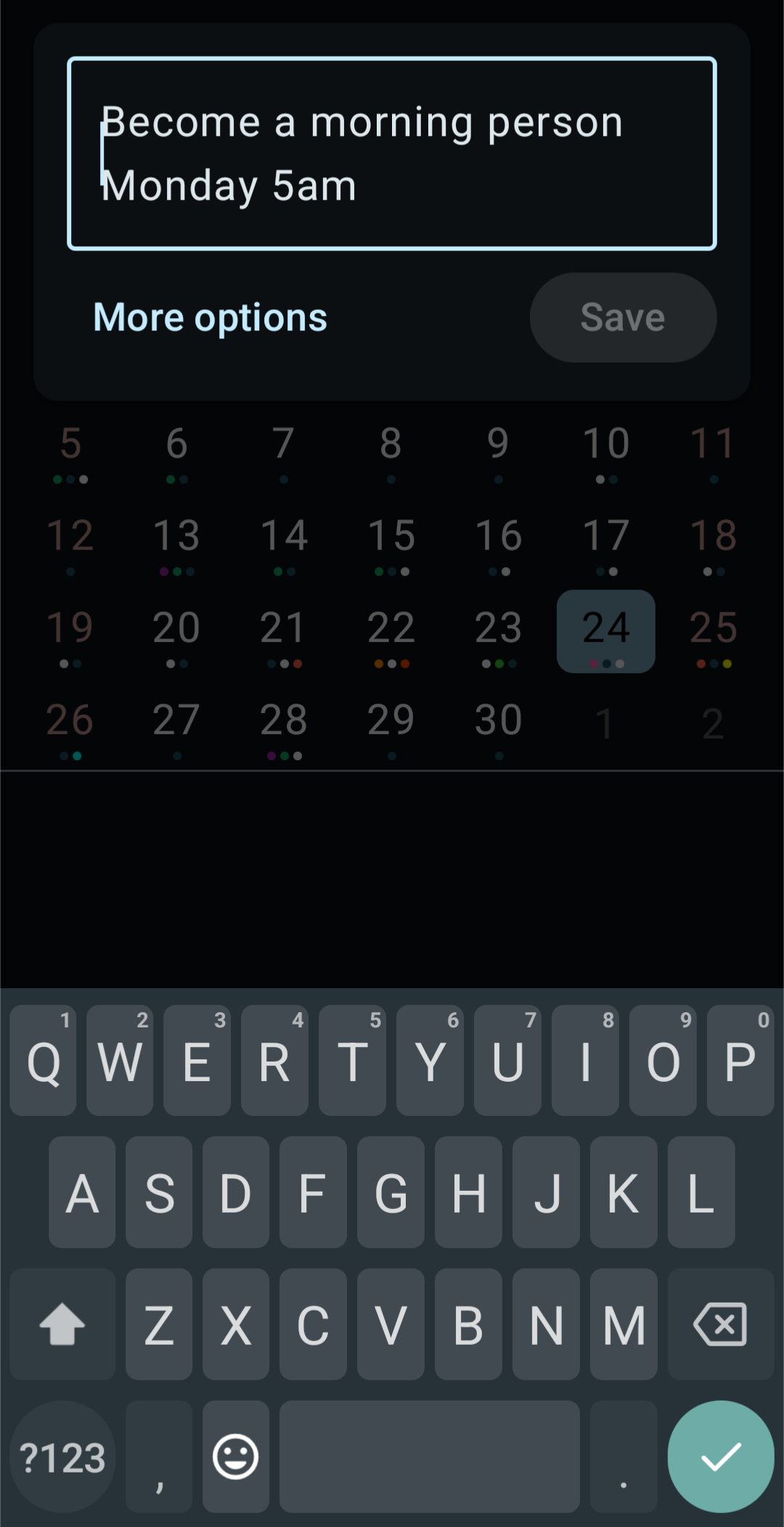
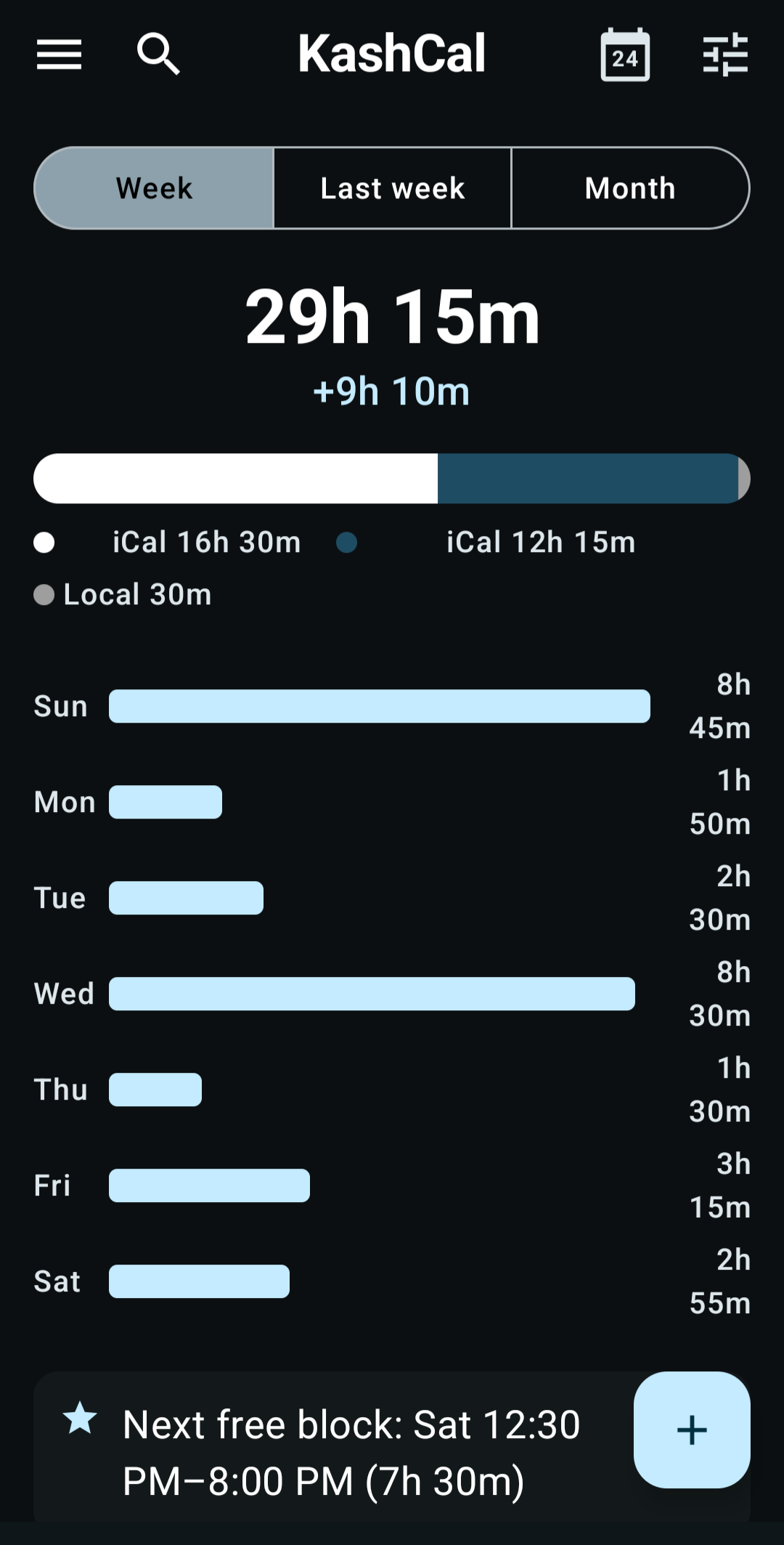
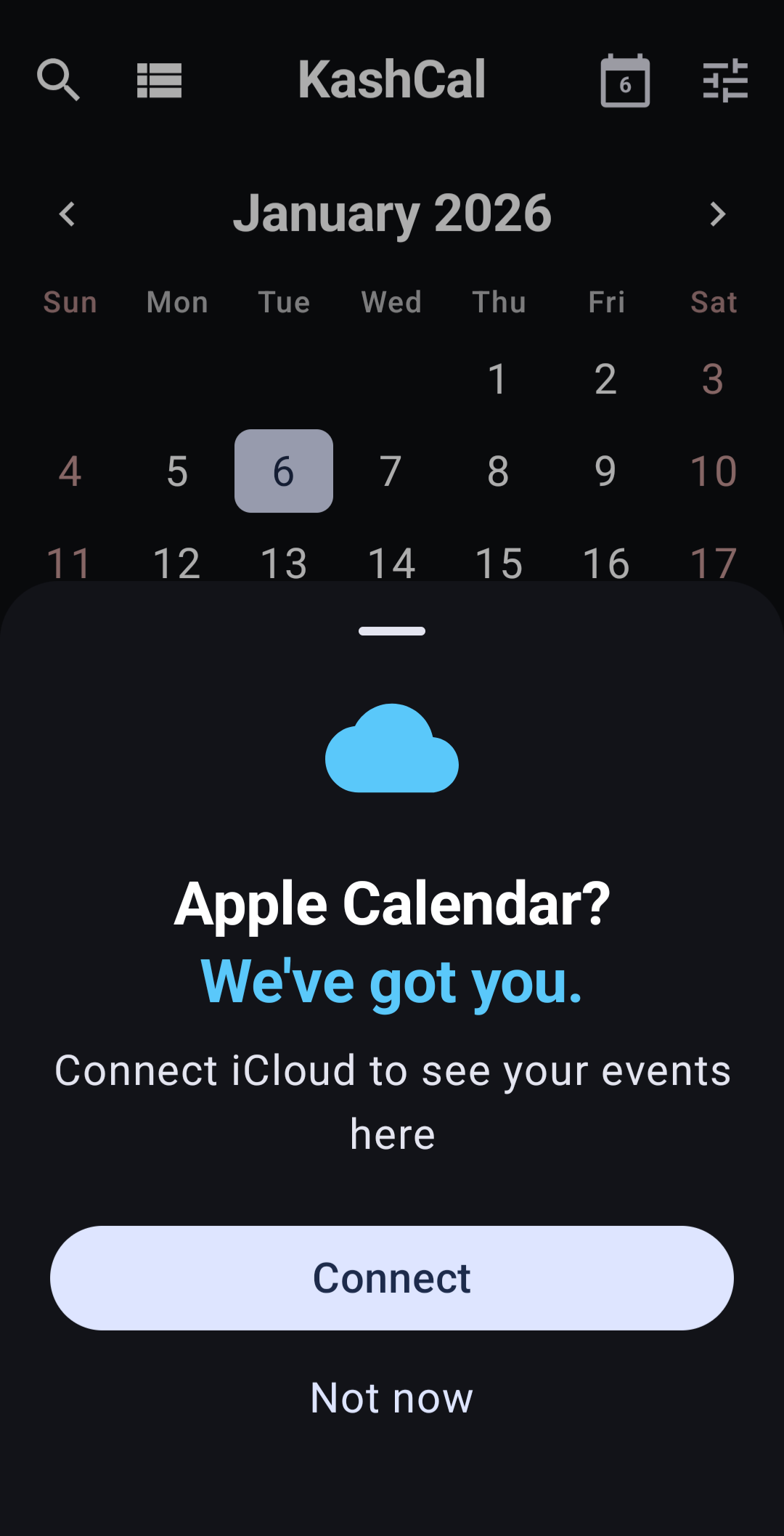
<div align="center" style="display:flex;gap:0.9rem;justify-content:center;flex-wrap:wrap;margin:2rem 0"><img src="https://kashcal.onekash.org/img/screenshots/Quick-Event-Add.png" alt="KashCal Quick Add turning plain text into an event" width="200" style="border-radius:14px;box-shadow:0 14px 34px -18px rgba(0,0,0,0.5)"><img src="https://kashcal.onekash.org/img/screenshots/Insights.png" alt="KashCal Insights showing on-device time analytics" width="200" style="border-radius:14px;box-shadow:0 14px 34px -18px rgba(0,0,0,0.5)"><img src="https://kashcal.onekash.org/img/screenshots/Apple-Calendar-Connect.png" alt="KashCal connecting an iCloud calendar on Android" width="200" style="border-radius:14px;box-shadow:0 14px 34px -18px rgba(0,0,0,0.5)"></div>
<h2 class="anchor anchorTargetStickyNavbar_Vzrq" id="the-list">The list<a href="https://kashcal.onekash.org/blog/kashcal-challenge#the-list" class="hash-link" aria-label="Direct link to The list" title="Direct link to The list" translate="no">​</a></h2>
<ul>
<li class=""><strong>A new event from Quick Settings.</strong> Drop a KashCal tile next to your flashlight and Wi-Fi toggles. Pull down from the top of the screen, tap it, and you're typing a new event, even over whatever app you were in. The fastest way to catch a plan before it slips.</li>
<li class=""><strong><a class="" href="https://kashcal.onekash.org/docs/events/quick-add">Plain-language events.</a></strong> Type "Yoga every Tuesday 7am at the studio" and it becomes a real recurring event, with the time, the place, the repeat, and the title each landing where they belong.</li>
<li class=""><strong><a class="" href="https://kashcal.onekash.org/features/share-event-as-card-android">Share an event as a card.</a></strong> One tap turns any event into a designed card and a tap-to-add file, sent together in any chat. Your friend taps once to drop it on their own calendar. No screenshots to retype, no invite that drags in extra apps.</li>
<li class=""><strong><a class="" href="https://kashcal.onekash.org/features/all-your-calendars-google-outlook-android">Real CalDAV, out of the box.</a></strong> Nextcloud, Radicale, Fastmail, Baikal, Zoho, SOGo, Stalwart, and more, syncing two ways with no middleware app, no relay server, and no second thing to install. Your phone's Google and Outlook calendars ride along too.</li>
<li class=""><strong><a class="" href="https://kashcal.onekash.org/features/icloud-calendar-android">iCloud on Android.</a></strong> Sign in once and your iCloud calendars sync both ways, shared family calendars included. No bridge, no export-import dance.</li>
<li class=""><strong><a class="" href="https://kashcal.onekash.org/features/calendar-insights-android">Time insights, on-device.</a></strong> Busiest day, meeting-free days, weekend load, your next free block. It works the numbers out on your phone, no work account and no cloud crunching your schedule.</li>
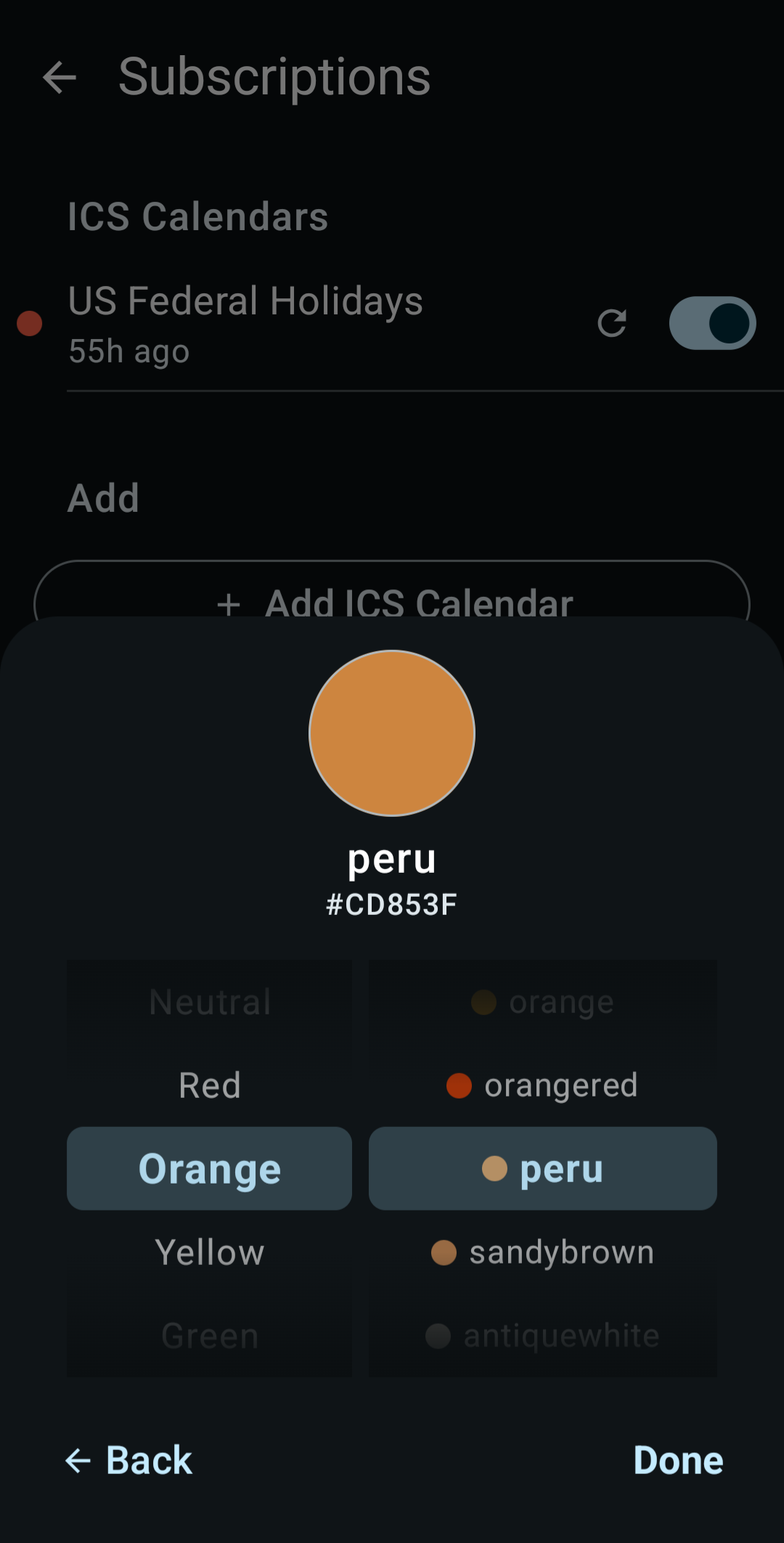
<li class=""><strong><a class="" href="https://kashcal.onekash.org/features/beautiful-calendar-android">Six views, your way.</a></strong> Month, agenda, three-day, week, month-full, and year. Pinch to zoom, drag to reschedule, and color any event from a curated palette or the full color wheel.</li>
<li class=""><strong>Private and free.</strong> No KashCal account, ever. No ads, no trackers, no analytics. Credentials are encrypted with the Android Keystore, and the whole thing works offline from first install. Free and open source under Apache-2.0.</li>
</ul>
<p>None of the above is a trial, a teaser, or a "pro" tier. It's the whole app. Found
the one thing your old calendar couldn't do? That's your challenge entry.</p>
<h2 class="anchor anchorTargetStickyNavbar_Vzrq" id="take-the-challenge">Take the challenge<a href="https://kashcal.onekash.org/blog/kashcal-challenge#take-the-challenge" class="hash-link" aria-label="Direct link to Take the challenge" title="Direct link to Take the challenge" translate="no">​</a></h2>
<ol>
<li class=""><strong>Get it, then brag.</strong> <a class="" href="https://kashcal.onekash.org/docs/getting-started/install">Install KashCal</a> and find the thing your old calendar couldn't do.</li>
<li class=""><strong>Post it.</strong> A screenshot or one line, anywhere you hang out, tagged <strong>#KashCal</strong>.</li>
<li class=""><strong>Dare a friend.</strong> "Mine can do this. Can yours?" Then pass it on.</li>
</ol>
<h2 class="anchor anchorTargetStickyNavbar_Vzrq" id="lines-to-steal">Lines to steal<a href="https://kashcal.onekash.org/blog/kashcal-challenge#lines-to-steal" class="hash-link" aria-label="Direct link to Lines to steal" title="Direct link to Lines to steal" translate="no">​</a></h2>
<p>Pick the one that's true for you, copy it, and post it wherever you already hang out:
Reddit, Mastodon, X, Lemmy, a group chat. Tag it <strong>#KashCal</strong> and dare a friend to
match it.</p>
<blockquote>
<p>My calendar opens a new event from the Quick Settings panel, before I've even left the app I'm in. Can yours? #KashCal</p>
</blockquote>
<blockquote>
<p>I type "dinner with mom friday 7pm" and my calendar just makes the event. No form. Free, open source, no account. #KashCal</p>
</blockquote>
<blockquote>
<p>Finally syncing my iPhone family calendar on Android with no middleman. #KashCal</p>
</blockquote>
<blockquote>
<p>Found an Android calendar with real CalDAV out of the box, on-device time insights, and a 92-color wheel. No ads, no trackers, no paywall. #KashCal</p>
</blockquote>
<div align="center" style="margin:2rem 0"><img src="https://kashcal.onekash.org/img/screenshots/ICS-Subscription.png" alt="KashCal color picker showing the named color peru, hex CD853F" width="220" style="border-radius:14px;box-shadow:0 14px 34px -18px rgba(0,0,0,0.5)"><div style="font-size:0.85rem;opacity:0.7;margin-top:0.6rem">92 colors, each with a real name. Yes, "peru" is a color. We were as surprised as you.</div></div>]]></content>
        <author>
            <name>Kash</name>
        </author>
        <category label="Announcements" term="Announcements"/>
        <category label="Features" term="Features"/>
    </entry>
</feed>